

11 Ways Opportunity Products Deliver Big Benefits In Salesforce
Opportunity products transform your sales process, deliver accurate forecasting and improve pipeline control
Last updated February 9, 2026

Opportunity products in Salesforce set the foundation upon which you can realize significant business benefits. Yet not every company uses opportunity products – and even those that do, aren’t constantly optimizing the value they unlock.
Why?
Well, there are many reasons, but the following are a handful of common objections (and most importantly, how they’re typically overcome!):
- “We sell services, not physical products”
Opportunity products represent what you deliver to the customer — tangible or intangible. Services benefit just as much.
- “Our pricing is too complex”
Price books, volume pricing, and subscription tools support even sophisticated pricing models.
- “Salesforce doesn’t support quantity-based discounts”
It does when you use GSP Volume Pricing to automatically calculate tiered and banded discounts natively in Salesforce.
- “Salesforce doesn’t support subscription pricing”
It will with GSP Subscription Manager – this app supports recurring revenue and SaaS renewals, evergreen services, and MRR/ARR tracking.
- “It takes too long to add products”
Tools like GSP Product Manager dramatically reduce effort with search, bundles, and product groups.
- “Salespeople won’t adopt it”
When products are easy to add and help reps close bigger deals faster, adoption follows.
- “We sell via framework or multi-year agreements”
Opportunity products preserve expected revenue streams over the lifecycle of umbrella contracts.
Why Should We Use Opportunity Products in Salesforce?
In this comprehensive guide, we explore what opportunity products are, why it’s critical to use them, and 11 practical ways they increase Salesforce benefits across sales, operations, and finance.
How Opportunity Products deliver big benefits in Salesforce
What are Opportunity Products in Salesforce?
Opportunity products are the goods and services your salespeople sell to customers and prospects on an opportunity in Salesforce. A single opportunity can have one or many opportunity products.
In this example, the three opportunity products represent a combination of physical goods and services the company provides.
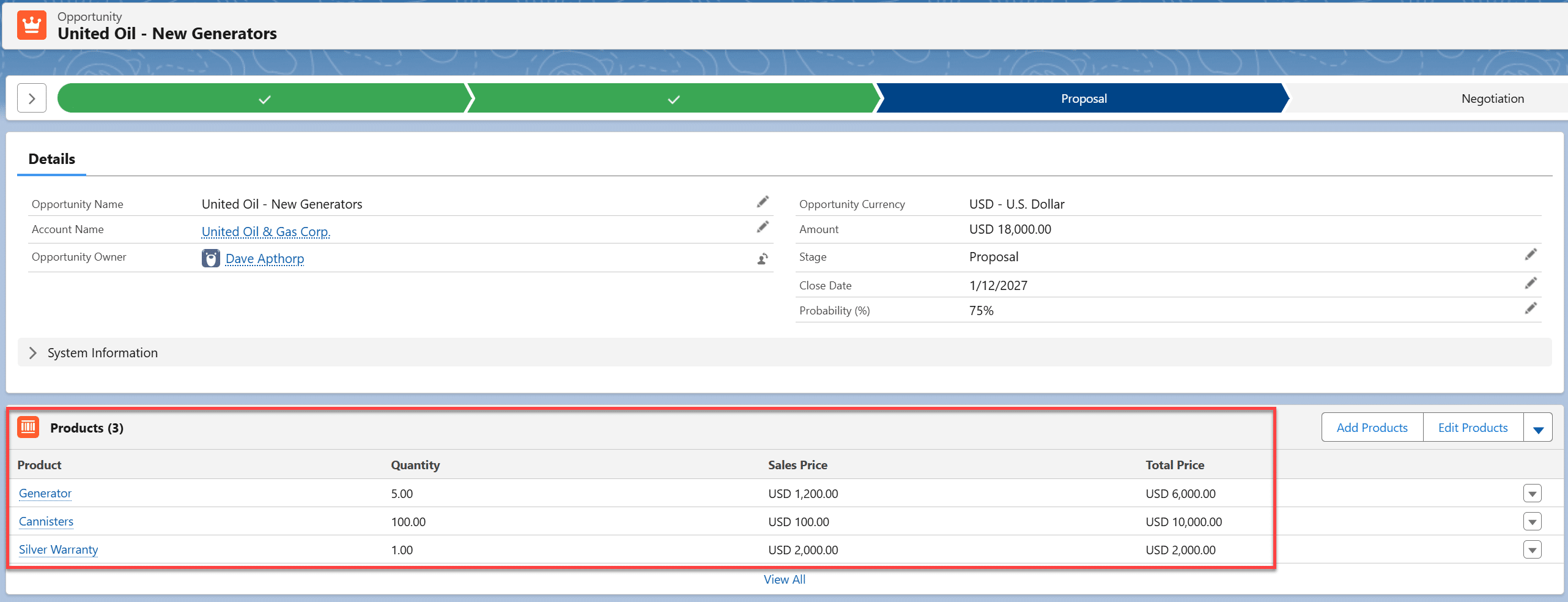
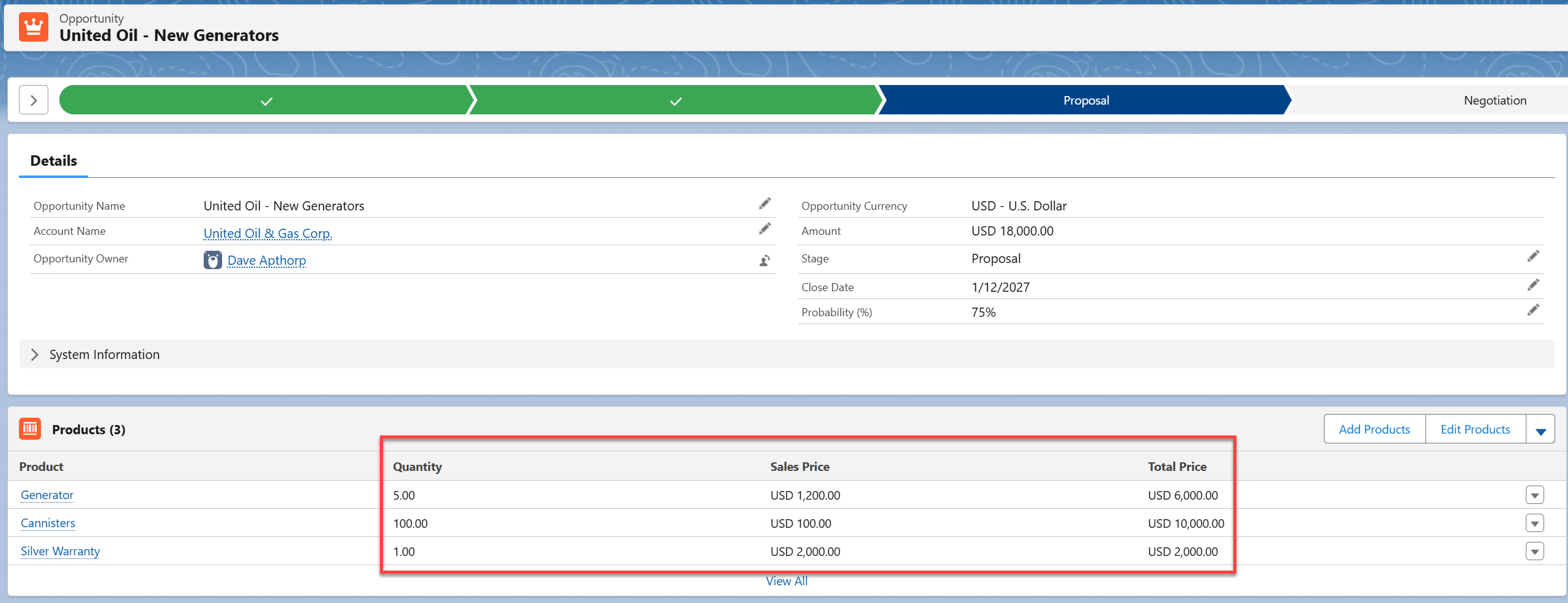
‘Quantity × Sales Price’ automatically calculates the Total Price on each line item
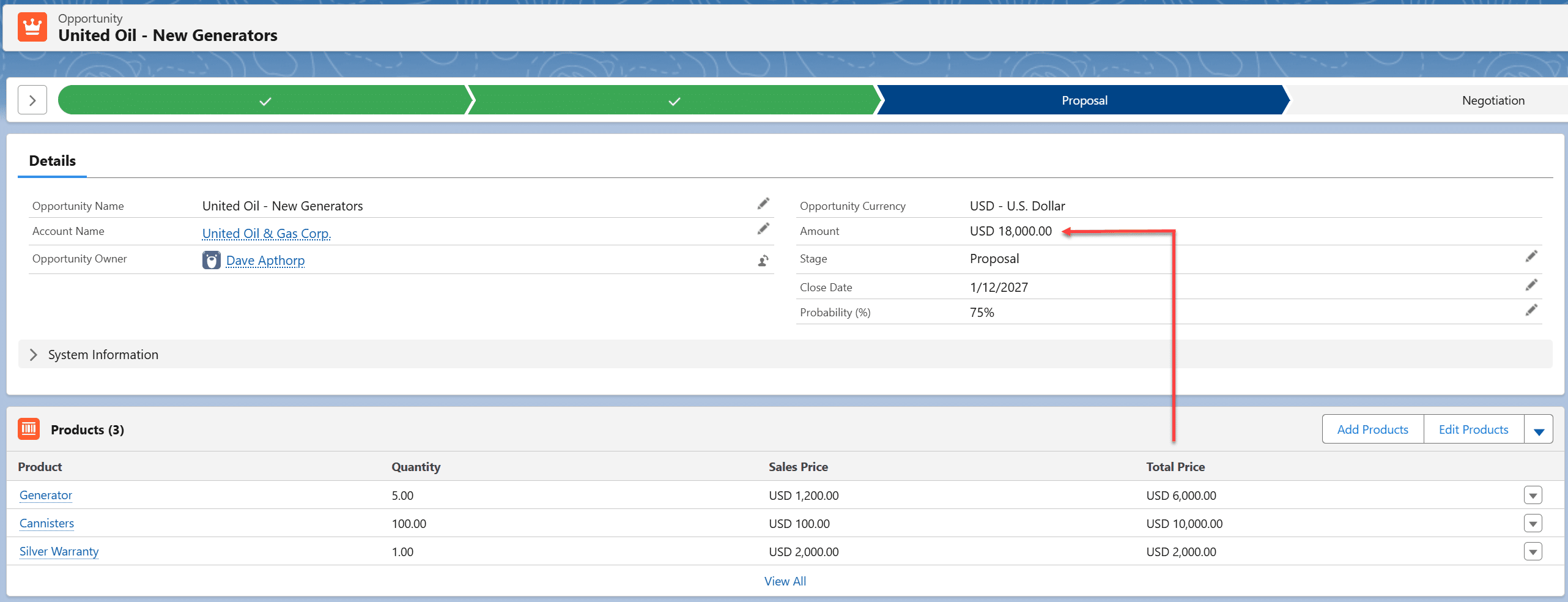
The Total Price of each line item rolls up to the Amount field on the opportunity.
Incidentally, opportunity products can include zero-priced items you may provide to the customer within the context of the deal. It’s often valuable to track these items for fulfilment and margin calculation purposes.
What's the Difference Between a Product and an Opportunity Product?
The difference between a product and an opportunity product is that while products define your catalog, opportunity products in Salesforce define what has been sold on a specific deal.
Why Use Products in Salesforce?
There are many great benefits to be realized when you use opportunity products in Salesforce, including:
- Implement strategic pricing.
- Gain control over discounts and margins.
- Improve pipeline reporting and revenue accuracy.
- Implement volume pricing in Salesforce.
- Identify cross-selling opportunities.
- Sell using product bundles and groups.
- Schedule and forecast revenue over time.
- Streamline sales processes.
- Sell subscription products using Salesforce.
- Reduce forecast risk.
- Create a platform for a revenue system.
More on these later!
What's the Alternative to Using Opportunity Products in Salesforce?
If you don’t use opportunity products in Salesforce, the most common alternative is to enter a single deal value in the Amount field.
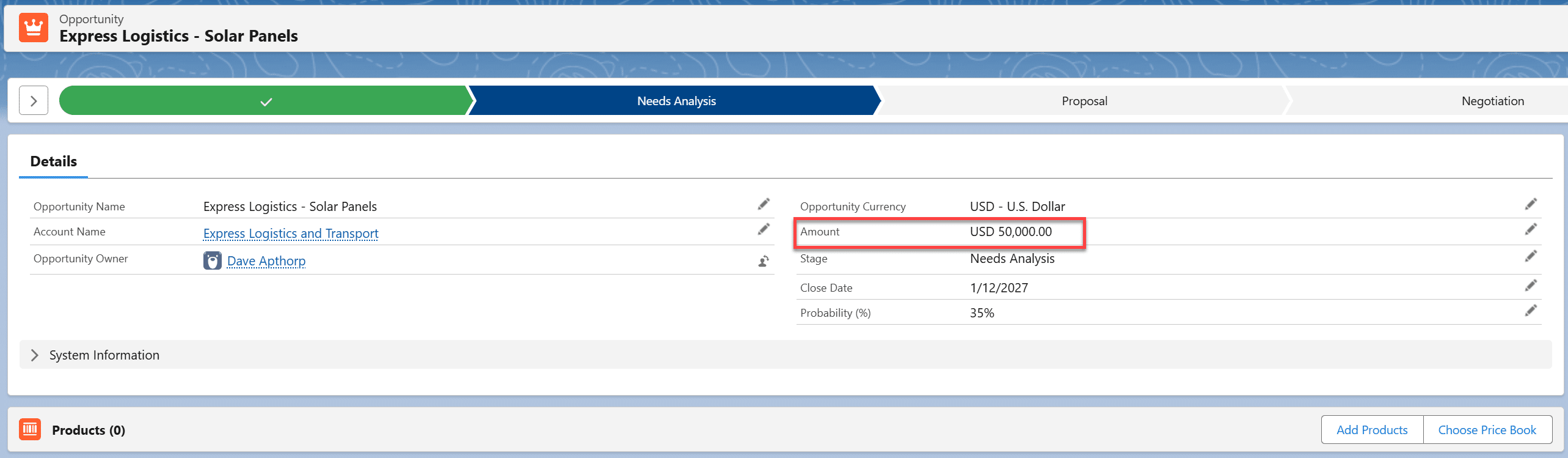
Unfortunately, this approach tells you very little about what is being sold, which limits:
- Forecasting accuracy.
- Pipeline visibility.
- Margin control.
- Process automation.
Some companies try to compensate by creating multiple custom value fields on the opportunity.

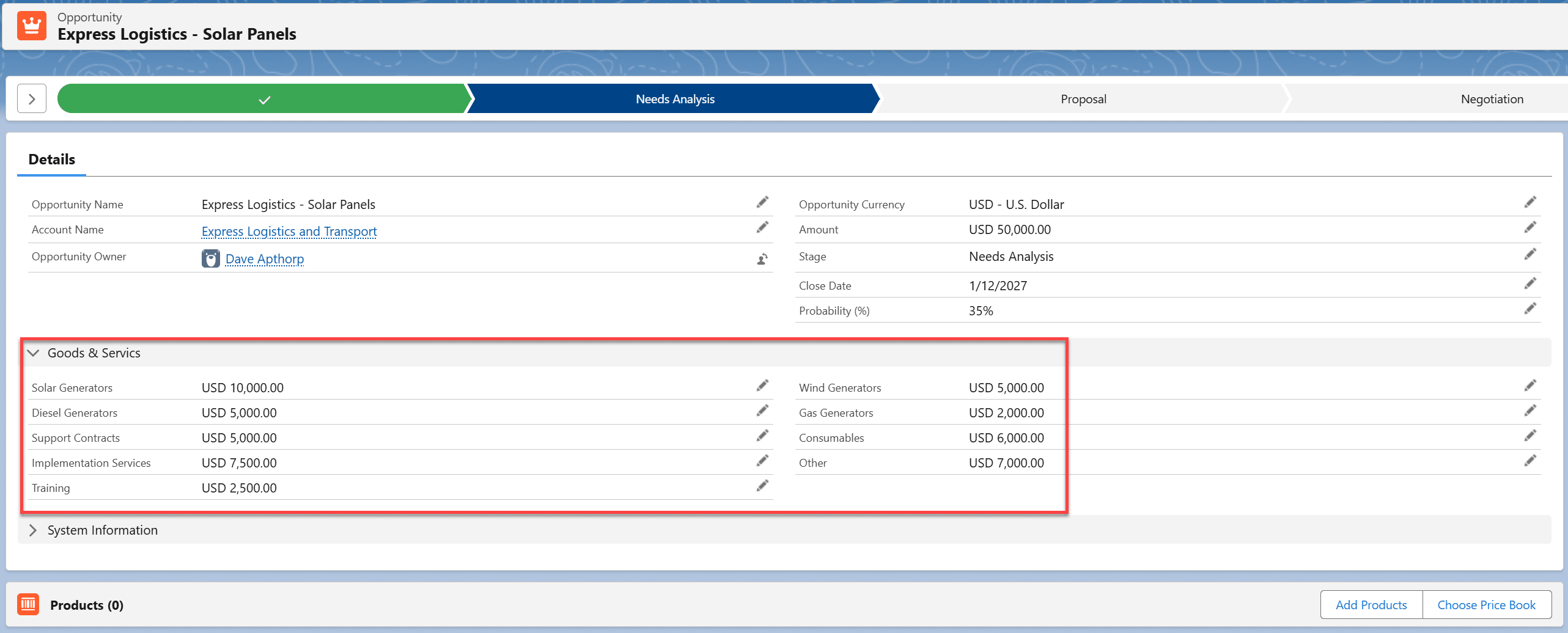
If this sounds familiar, you already know how difficult it is to report accurately or forecast confidently using this model.
How do Price Books relate to Products and Opportunity Products?
Price books control which products can be sold — and at what price — per customer, region, or segment. They are essential for pricing governance and scalable selling.
The standard price book in Salesforce includes ALL products. Therefore, if every customer can purchase any product, and everyone gets the same list price, this is all you need.
However, price books are the building blocks of more sophisticated pricing strategies. For example, you might have a different price book for strategic customers, standard customers, and not-for-profits. The Sales Price of a widget might be $100 in the strategic customer price book and $120 in the standard customer price book. Perhaps the widget doesn’t appear in the not-for-profit price book at all, because for commercial or legal reasons, you don’t sell this item to charitable organizations.
You get the idea: price books enable significant flexibility in controlling opportunity products, because they govern what salespeople can sell and at what price.
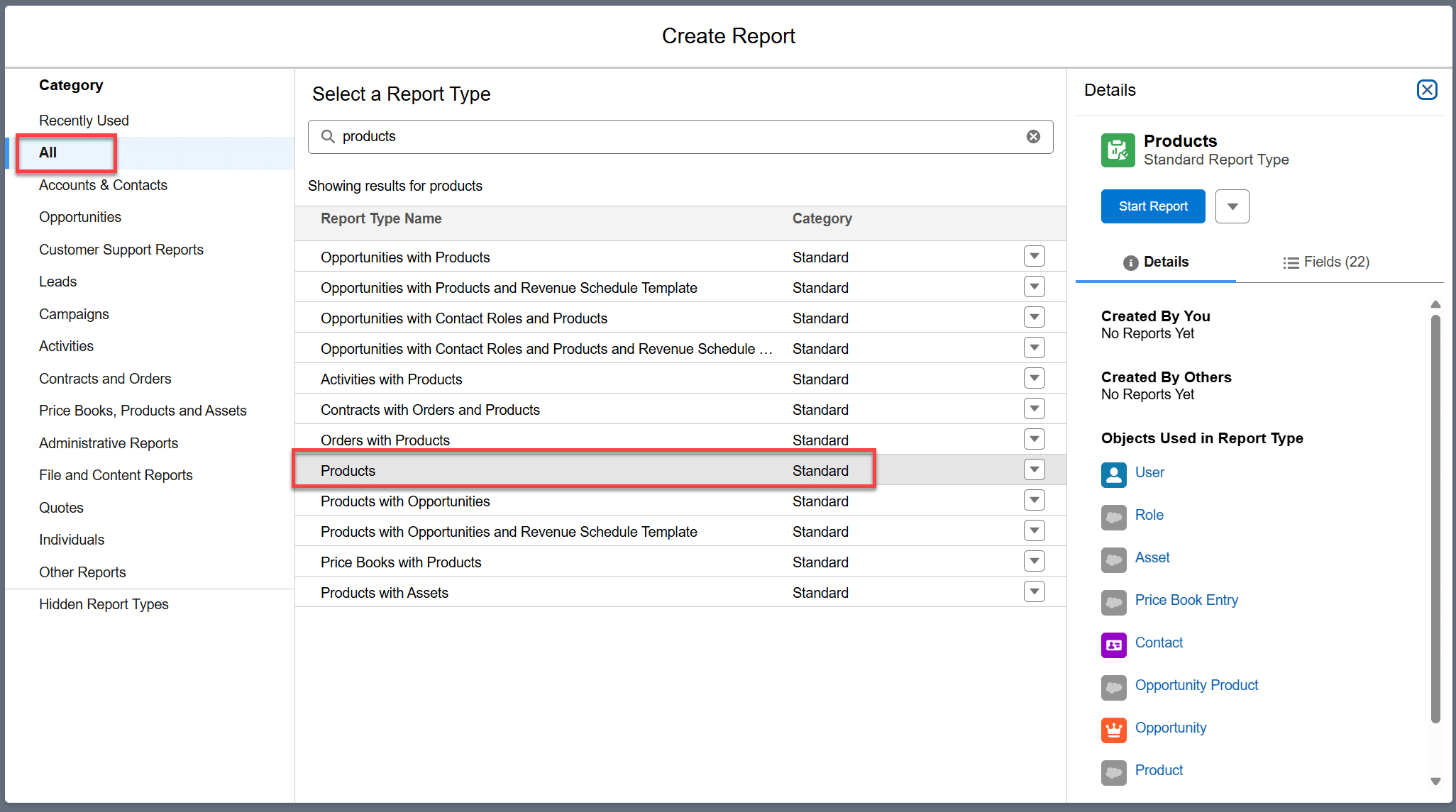
How do I report on Products in Salesforce?
You can report on Products in Salesforce using Report Type, Products. Tip: Select ‘All’ as the Category on the left and side to see the Report Type.
To report on revenue associated with product sales in Salesforce, use the Report Type, Opportunities with Products.
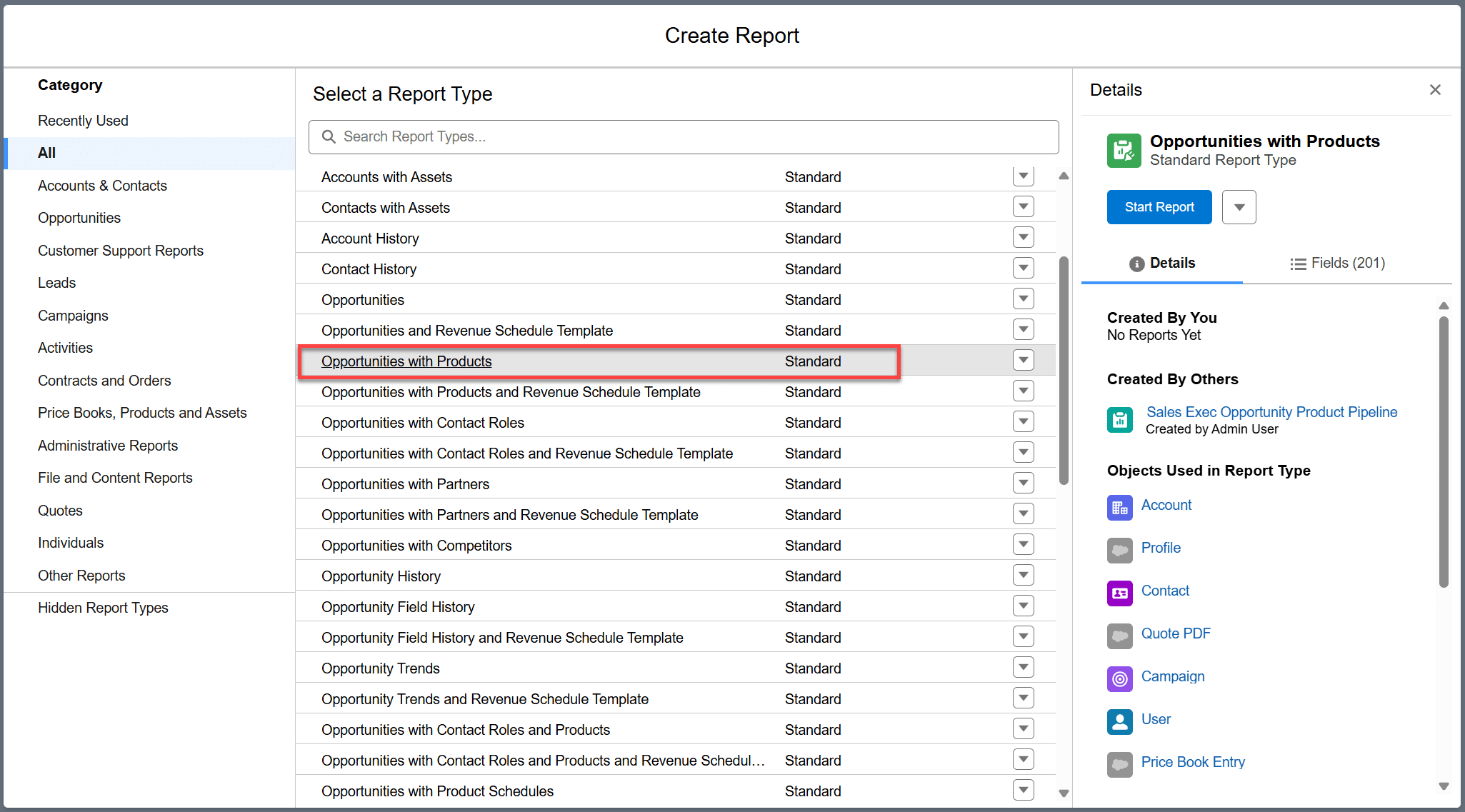
Total Price is the field you need in the report to sum revenue sales by Product. To categorize Products in the report, use the Product Family field.
11 Ways Opportunity Products Deliver Benefits in Salesforce
1. Opportunity Products Help You Implement Strategic Pricing in Salesforce
In many companies, not all customers should receive the same price, or even have access to the same product set. In Salesforce, opportunity products and price books are what enable your sales ops and finance teams to control segmented pricing.
This means you can:
- Differentiate pricing by customer, region, channel, or other parameters.
- Control the products that can be added to an opportunity.
- Automatically associate the relevant product/price catalog to each opportunity in Salesforce.
For example, imagine you have a product with a standard List Price of $1,000 in the USA. You might implement the following pricing strategy:
- $1,000 for standard customers in the USA.
- $950 for strategic customers in the USA.
- $900 for Acme Manufacturing, your most significant and important customer.
- $850 for OEMs and partners.
You might also have additional prices for Canadian or European customers. Furthermore, there may be some customer segments where you want to limit the availability of specific products within your total catalog.
To secure this benefit
- Control pricing and access to products at the opportunity level through price books.
- Start by defining the price books needed to support your pricing strategy.
- Ask for a free consultation with GSP to kickstart this process.
2. Opportunity Products Give You Control Over Discounts and Margins
Centralized pricing and approval workflows eliminate spreadsheet dependency and hidden discounts – music to the ears of finance and sales managers. Use opportunity products (optionally in conjunction with the standard approval processes in Salesforce) to deliver control over discounts and margins.
This means you can:
- Eliminate dependencies on spreadsheets, which are often out of date.
- Prevent inaccurate prices from being quoted to customers.
- Gain control over discounts.
- Report on discounts and margin reductions.
To secure this benefit
- Migrate external spreadsheets to products in Salesforce.
- Consider using the standard approval processes.
- Review the low-risk and low-cost alternatives to CPQ if you have a complex product/price catalog.
3. Opportunity Products Improve Pipeline Reporting and Revenue Accuracy
Opportunity products unlock SKU-, product-, and category-level pipeline reporting. This supports sales ops in improving forecast accuracy and provides leadership with better pipeline visibility.
This means you can:
- View the pipeline and won revenue by SKU, product, and product category levels.
- Provide fulfilment teams with early visibility of upcoming demand.
- Identify weak spots in product-level selling effectiveness.
For example, this dashboard chart shows the current pipeline by product family.
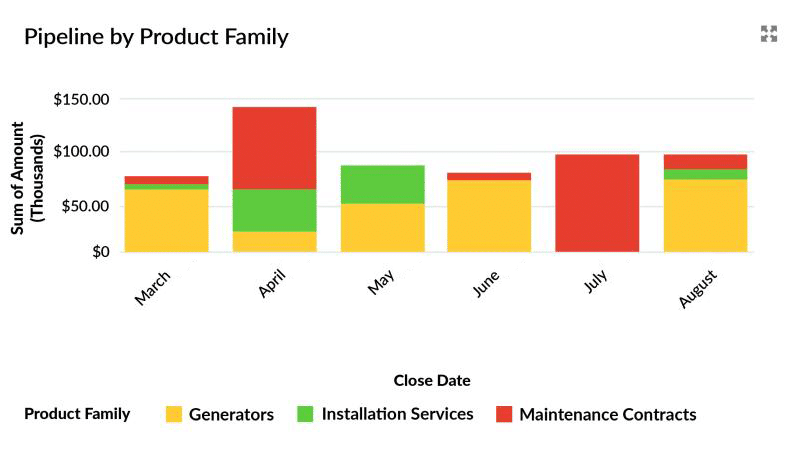
This Salesforce report shows the won revenue by product category.
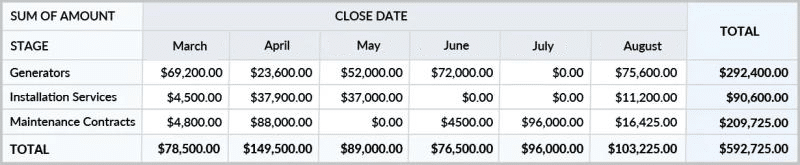
Click on any number in the report to see the underlying detail on product sales.
To secure this benefit
- Set an appropriate Product Family value for every product.
- Use the Opportunities With Products report type to build appropriate reports.
4. Opportunity Products Support Volume Pricing in Salesforce
Quantity-based discounting is standard in many industries and businesses. But without CPQ, there is no out-of-the-box functionality to automate volume discounts in Salesforce. However, GSP Volume Pricing helps sales reps and finance to solve this problem.
This means you can:
- Automate tier and band-based discounts to improve consistency and speed.
- Ensure customers are always quoted the appropriate price based on segment and volume.
- Control and track additional discounts offered by salespeople beyond the pre-defined volume price.
For example, in Omada Identity, salespeople previously had to consult a wide range of complex spreadsheets to calculate customer pricing. Now, volume prices are automatically calculated within Salesforce. In addition, approval processes and reporting provide control and visibility of discounts that deviate from the pre-defined quantity-based prices.
“The GSP Volume Pricing app transformed the way our salespeople use Salesforce. We no longer maintain many spreadsheets with everyone using different versions, since all our pricing now happens directly in Salesforce.”
Alex Ferrario, Revenue Operations Manager, Omada
To secure this benefit
5. Opportunity Products Help Identify Cross-Selling Opportunities
Product level insights help your sales and account managers to pinpoint coaching needs and customer expansion opportunities. Also, once deals are complete, you can identify customers who are viable prospects for other related products and services.
This means you can:
- Identify coaching needs for salespeople who are not selling the full product range.
- Improve average deal size by acting upon sub-optimum opportunities.
- Review customers with completed deals to identify subsequent cross-selling opportunities.
For example, this chart shows the average deal size of three salespeople.
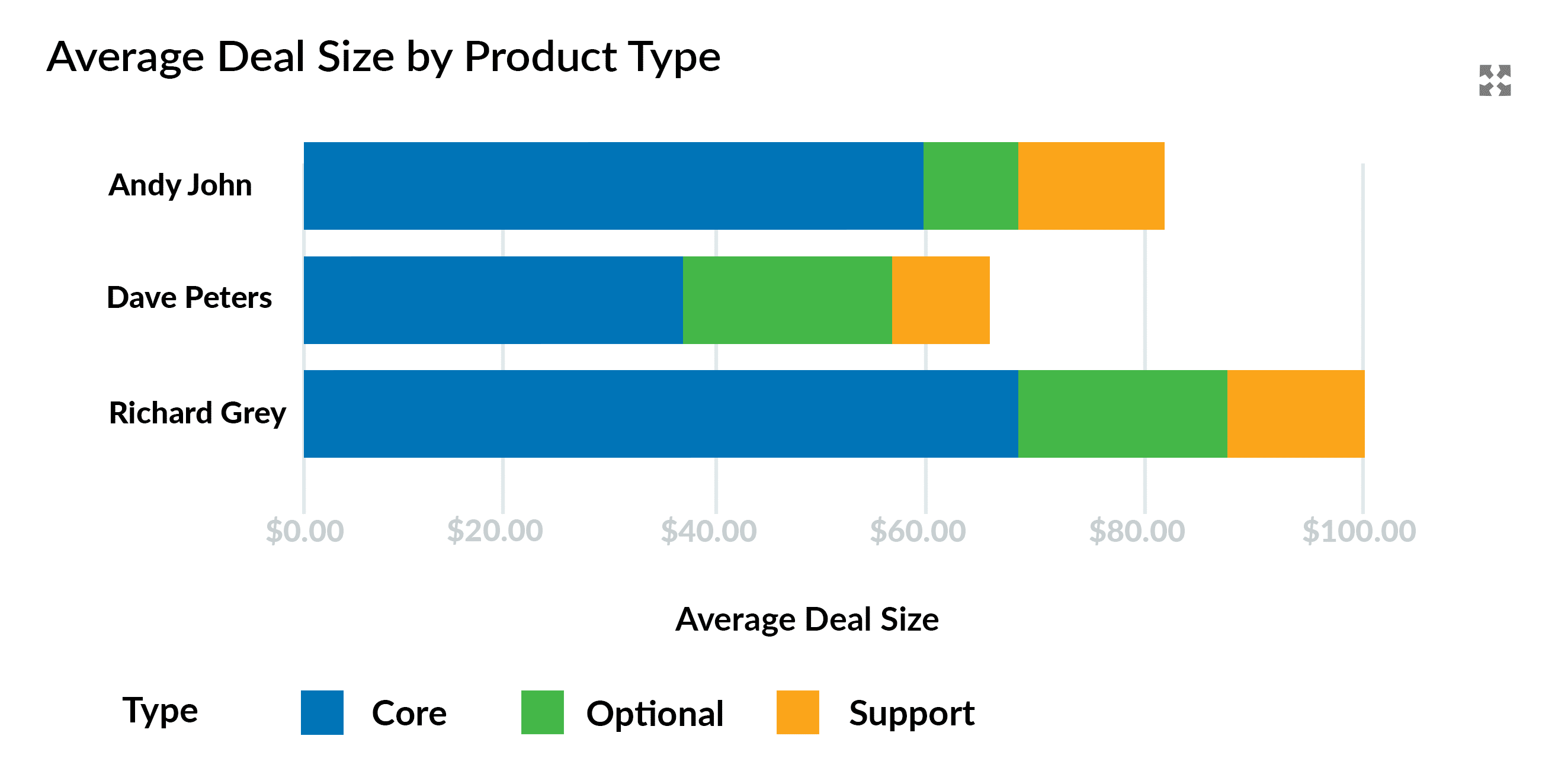
Why does Richard have the most significant average deal value? Because he is selling more products in the ‘Optional’ category.
What the chart doesn’t tell us is how Dave can increase his average deal size. Perhaps he needs to improve his technical understanding of other products. He may require coaching on introducing additional services. Potentially, Richard needs to work harder during the Investigation Stage of the sales cycle to understand potential customers’ needs better.
You get the idea – visibility on opportunity products enables you to make coaching interventions that lead to increased average deal size.
To secure this benefit
- Use the standard report type, Opportunities With Products.
- Set the Total Price in the report to “Average” rather than Sum.
6. Opportunity Products Enable You to Sell Using Product Bundles and Groups
Product bundles simplify selling, increase deal size, and reduce fulfilment errors. But many people (wrongly!) believe you can only sell using product bundles and groups in Salesforce if you have CPQ or the Revenue Cloud. With GSP Product Manager, your sales reps and operations teams can quickly and easily add bundles and groups to opportunities.
This means you can:
- Make it easy for salespeople to add products, bundles, and groups to opportunities and quotes.
- Increase average deal size by adding supplementary products as part of a group or bundle.
- Avoid fulfilment or downstream problems that arise from missing products.
For example, Medora has a vast product catalog with many customers needing to purchase multiple goods and services to meet their needs. Previously, it was challenging for salespeople to find the right combination of items from the catalog. However, by grouping the most common combinations into bundles and product groups, salesperson productivity has increased, customer satisfaction has improved, and fulfilment errors have been minimized.
“Users were spending hours on things that should only take a few minutes. GSP Product Manager has transformed the way we sell; the app is highly user-friendly, and the GSP team was highly responsive and helpful.”
Jennifer Sykora, Product Manager, Medora
To secure this benefit
- Trial GSP Product Manager.
7. Opportunity ProductsHelp Schedule and Forecast Revenue Over Time
In many businesses, no money changes hands when a deal is won. Instead, revenue accrues over time. As a result, these companies need to forecast won and pipeline revenue over months or years – and sometimes, these forecasts must reflect a ramp-up or other non-linear revenue schedule.
There are two ways for finance and RevOps teams to achieve this in Salesforce:
- Standard Salesforce schedule function: many people find this feature limited, challenging for salespeople to use, and restricted in its reporting capabilities.
- The GSP Product Schedules app: a more accurate, reliable, and quicker way to forecast won and pipeline revenue and quantity over time.
This means you can:
- Forecast cash flow, ramp-ups, and demand accurately.
- Use 4 revenue schedule templates to forecast revenue (straight-line, s-curve, pro rata by month, pro rata by day).
- Manually adjust forecast revenue to reflect ramp-ups or other fluctuations.
- Compare anticipated or expected revenue with actuals.
- Track revenue over time versus quota.
For example, NEP Group projects often last several years. The revenue profile varies by customer, often with a significant ramp-up. That means the company must accurately forecast revenue by product and service over an extended period.
In addition, NEP must compare the monthly revenue anticipated at the time the contract is signed with the actual invoices sent to the customer over time. Using GSP Product Schedules, the forecast revenue updates automatically whenever salespeople and project teams update opportunities in Salesforce.
“The GSP Product Schedules are fantastic – we absolutely love it, and it’s done amazing things to support NEP’s processes. The people and knowledge from GSP make it even more valuable.”
Carrie Cruz, Director, NEP Group
To secure this benefit
- Trial GSP Product Schedules.
8. Opportunity Products Help Streamline Sales Processes
Improving sales team productivity is a critical way to drive revenue growth – especially if it helps sales reps to close deals more quickly. Using opportunity products lets you embed quote templates and electronic signature apps into Salesforce, making it significantly easier for salespeople to issue quotes and for customers to provide approval.
This means you can:
- Automatically populate opportunity products onto quote templates.
- Send quotes and contracts to customers with a single click.
- Preserve all customer quotes in Salesforce.
- Enable customers to approve quotes and contracts using electronic signatures.
- Automatically store signed documents in Salesforce.
For example, Book4Time has an extensive range of products grouped into multiple price books. Each price book reflects the specific pricing and support agreements with the major hotel chains worldwide. This means that when they create an opportunity, salespeople are automatically presented with the relevant products and prices applicable to the chain.
Once the products are selected, salespeople can quickly create a quote, using templates tailored to each hotel chain. And with DocuSign embedded in Salesforce, it’s a synch for reps secure customer sign-off.
To secure this benefit
Review electronic signature applications on the AppExchange.
9. Opportunity Products Support Subscription Services in Salesforce
Despite Salesforce being a subscription service, the application does not include features or functionality for selling and managing subscriptions – unless you purchase CQP or the Revenue Cloud. However, with opportunity products, your sales teams CAN sell and manage subscription products in Salesforce using GSP Subscription Manager.
This means you can:
- Price and quote subscription products in Salesforce.
- Proactively manage renewals and customer retention.
- Track advanced MRR and ARR metrics.
- Sell using product bundles and packages.
- Integrate seamlessly with GSP Volume Pricing for quantity-based discounts.
For example, Trimble Applanix sells advanced location and mapping products, software, and support contracts worldwide, through a variety of direct and indirect channels. The company recently transitioned from perpetual software licenses to SaaS-based arrangements and continues to sell support and warranty contracts on a fixed-term renewal basis. Using GSP Subscription Manager they can easily manage renewal and evergreen services, as well as track monthly and annual recurring revenue.
"Using GSP Subscription Manager means that in Salesforce, we get a complete view of the monthly and annual recurring revenue from support and warranty contracts. The app automatically generates renewal opportunities for these contracts and helps us proactively manage customer relationships."
Keith Reid, Director of Customer Support, Trimble Applanix
To secure this benefit
- Trial GSP Subscription Manager.
10. Opportunity Products Reduce Forecast Risk
Opportunity products reduce uncertainty and deal inflation for sales leadership and finance teams. That’s because rather than have a vague number, total deal value is the sum of the specific products and associated quantities entered in Salesforce.
This means you can:
- Be assured of having fewer speculative deals.
- Detect inflated pipeline values earlier.
- Track reliable pipeline coverage metrics.
For example, Salespeople in Express Transport previously entered a single figure into the Amount field on each opportunity, which was vague and caused problems with forecasting and financial credibility. Now, using GSP Product Manager, once the opportunity reaches the Proposal Stage, the sales team quickly enters the specific products and services quoted to the customer.
“Salespeople actually love it. It only takes a few seconds, and the team appreciates having reports and dashboard charts they can actually rely upon”.
James Watson, VP of Sales, Express Transport
11. Opportunity Products as the Platform for a Revenue System
Opportunity products connect pricing, forecasting, revenue scheduling, and margin protection into a single system, which supports execs and RevOps teams with:
- Products & price books for pricing control.
- Opportunity products for forecasting accuracy.
- Product schedules for cash flow visibility.
- Bundles for upsell & cross-sell opportunities.
- Approval processes for margin protection.
How to Roll Out Opportunity Products Without Disrupting Sales?
Opportunity products aren’t simply a Salesforce feature — they’re the foundation for scalable, predictable revenue. But you need to follow a proven, methodical approach to avoid it disrupting your operations.
- Start by defining your products.
- Introduce price books.
- Add GSP Product Schedules if you need to spread revenue over time.
- Build opportunity product approvals.
- Implement bundles and groups using GSP Product Manager.
If you need help getting started, why not get in touch? Our team is always here and happy to help.
Opportunity Products: FAQs
Products represent the goods and services you sell – the collection of products represents your product catalog. Opportunity products are the specific items you sell to a customer during a sales opportunity.




Download the 12 Must-Have Charts for Your Salesforce Dashboard eBook today!